
 Vaultic
Secrets & the environment matrix
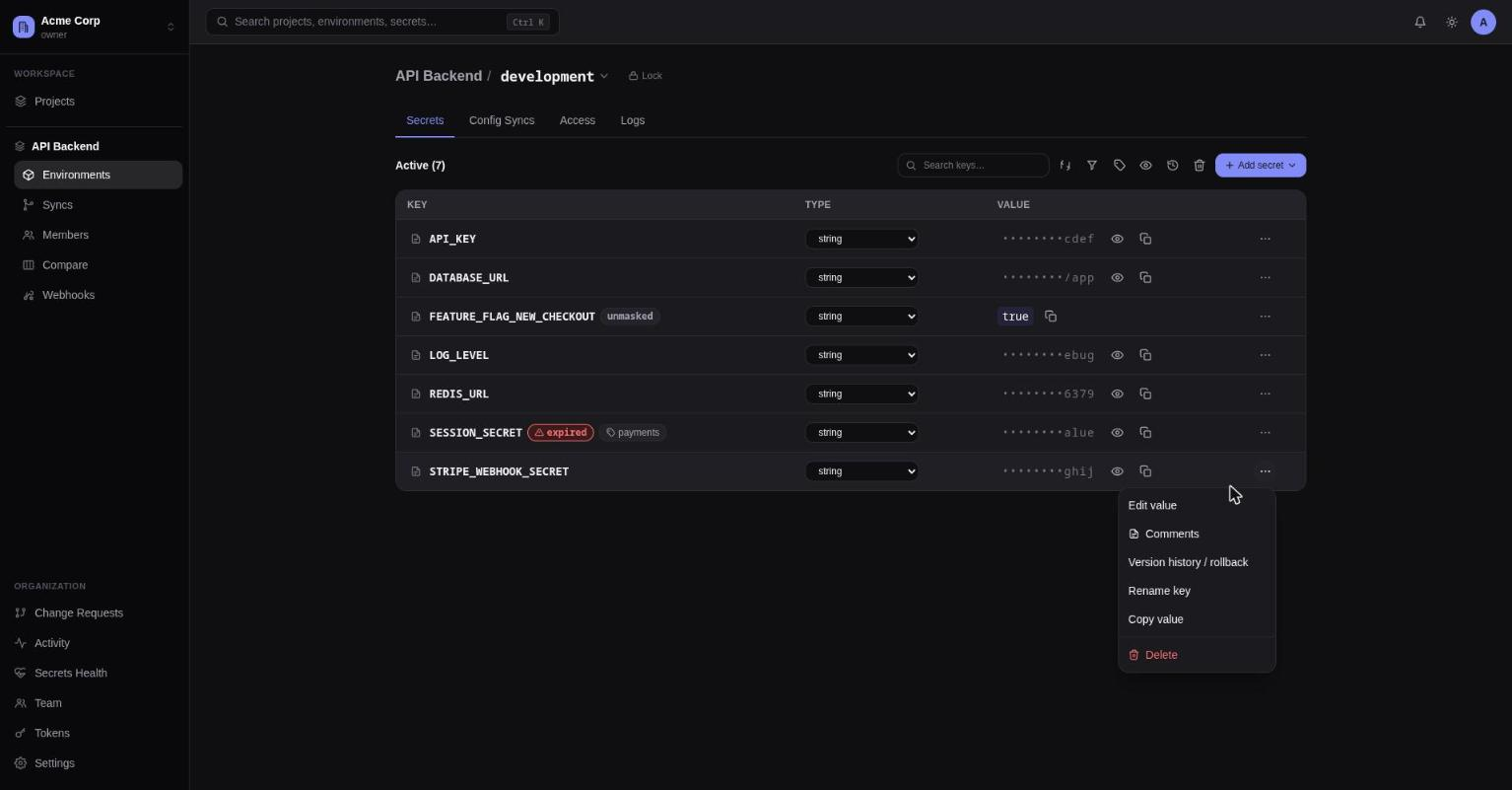
The Secrets tab for one environment, and the cross-environment Compare view.
The Secrets tab
The main secrets table for one environment, and the primary place to manage values day to day.
Toolbar: search (matches key or tag), sort (Key A→Z / Z→A / Recently updated), filter (by
type hint, or "Inherited only"), filter by tag, a reveal-all/hide-all toggle, a version-history
picker to jump straight to a key's history, a Trash button (30-day retention for deleted
secrets), and an "Add secret" split button (single secret, or bulk import by pasting .env
content).
Per-row details:
- Key — a note icon opens a comments panel (with a count badge if any exist, and fires a
notification for anyone
@mentionedin a new comment); inline badges showinherited · <parentEnv>for keys not overridden locally,personal overrideif you have one set,reffor reference/template values,expired/expires soonbased onexpiresAt,rotation dueif overdue, a lock icon +restrictedor anunmaskedbadge based on the secret's visibility, and any tags (clickable to filter). - Type — an inline select (string, multiline, json, url, boolean, number, certificate,
private-key); changing it re-saves the secret with the new type hint. Disabled on
restrictedrows, since changing type requires resubmitting the value and that can't be retrieved. - Value — masked by default; a Reveal button fetches and shows the real value, Copy fetches
and copies without ever displaying it.
unmaskedsecrets show their real value directly, with no Reveal button needed.restrictedsecrets show a lock icon instead — Reveal and Copy are unavailable; only a service token can retrieve the value. - Row menu — Edit value, Comments, Version history/rollback, Secret references, Rename, Copy
value, Share link, Delete. Version history/rollback, Rename, and Delete are disabled on
inherited-only rows (you edit those from the parent environment instead). Copy value and Share
link are disabled for
restrictedrows, since neither can retrieve the value.
Editing a restricted secret's value in the Add/Edit modal always starts from an empty value
field — its current value can't be shown, so you must enter a new one. The Visibility dropdown
only lets you loosen a restricted secret to masked/unmasked once you've typed a new value;
see Visibility for why.
Adding to or deleting from a locked environment doesn't apply immediately — it becomes a pending change proposal, and the UI shows a toast explaining that. See Locking & change requests.
An admin can disable personal overrides for a specific environment (column header menu → Settings). Turning it off wipes every existing personal override in that environment, not just hides them — everyone falls back to seeing the shared value.
Share links
Row menu → Share link opens a modal for handing a secret's current value to someone without
adding them to the workspace. Set an expiry duration (15m, 1h, 7d, ...), a max-view count,
or both — at least one is required, so a link can't be created with no limit at all.
Creating the link snapshots the resolved value at that moment: rotating the underlying secret
afterward doesn't change what the link reveals. The resulting /share/<token> URL is shown once,
with a Copy button, and needs no sign-in to view — the form and the result never share the same
screen, so a copied link can't be mistaken for the secret's actual value.
Unavailable for restricted secrets, since their value can't be retrieved to put in a link.
Prefer the terminal? vaultic share <key> does the same thing — see
CLI: sharing & webhooks.
Compare (the matrix view)
.../compare shows every key as a row and every environment as a column, side by side — the
closest thing to a bird's-eye view of a project's secrets. Each cell has its own reveal/copy/
delete actions; a ref badge marks reference values, and a missing badge flags a key that
exists in some environments but not this one.
Each column header has a lock/unlock toggle (locking an environment routes future direct writes
through approval) and a locked badge when applicable.
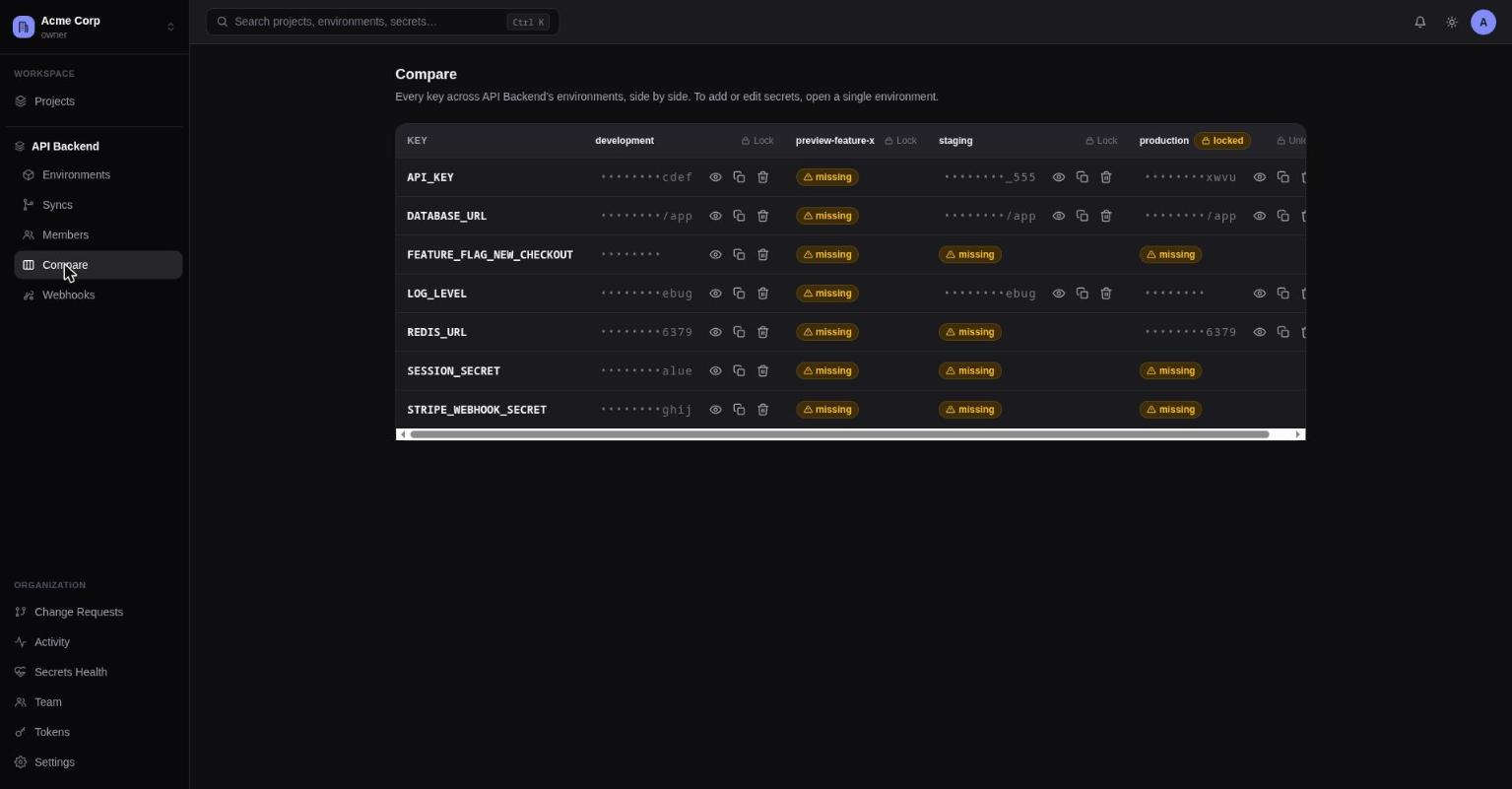
Compare is intentionally read/reveal/delete/lock-only — there's no way to add a secret from here. To add or edit values, open a single environment's Secrets tab.