
 Vaultic
Config Syncs (Git integration + cloud sync)
The inbound GitHub webhook that spawns/tears down ephemeral preview environments, plus per-environment automatic cloud secret store sync.
The Config Syncs tab covers two independent things:
- The project-level Syncs page and the project-wide part of this tab manage exactly one GitHub repo integration per project — the inbound webhook that auto-spawns ephemeral preview environments (below).
- When viewed from a single environment's tab, it also manages that environment's cloud secret
store sync configs — the one outbound secret push configurable from the web app (everything
else,
vaultic push github/push vercel, is CLI-only — see Automated syncs).
Git integration: setting it up
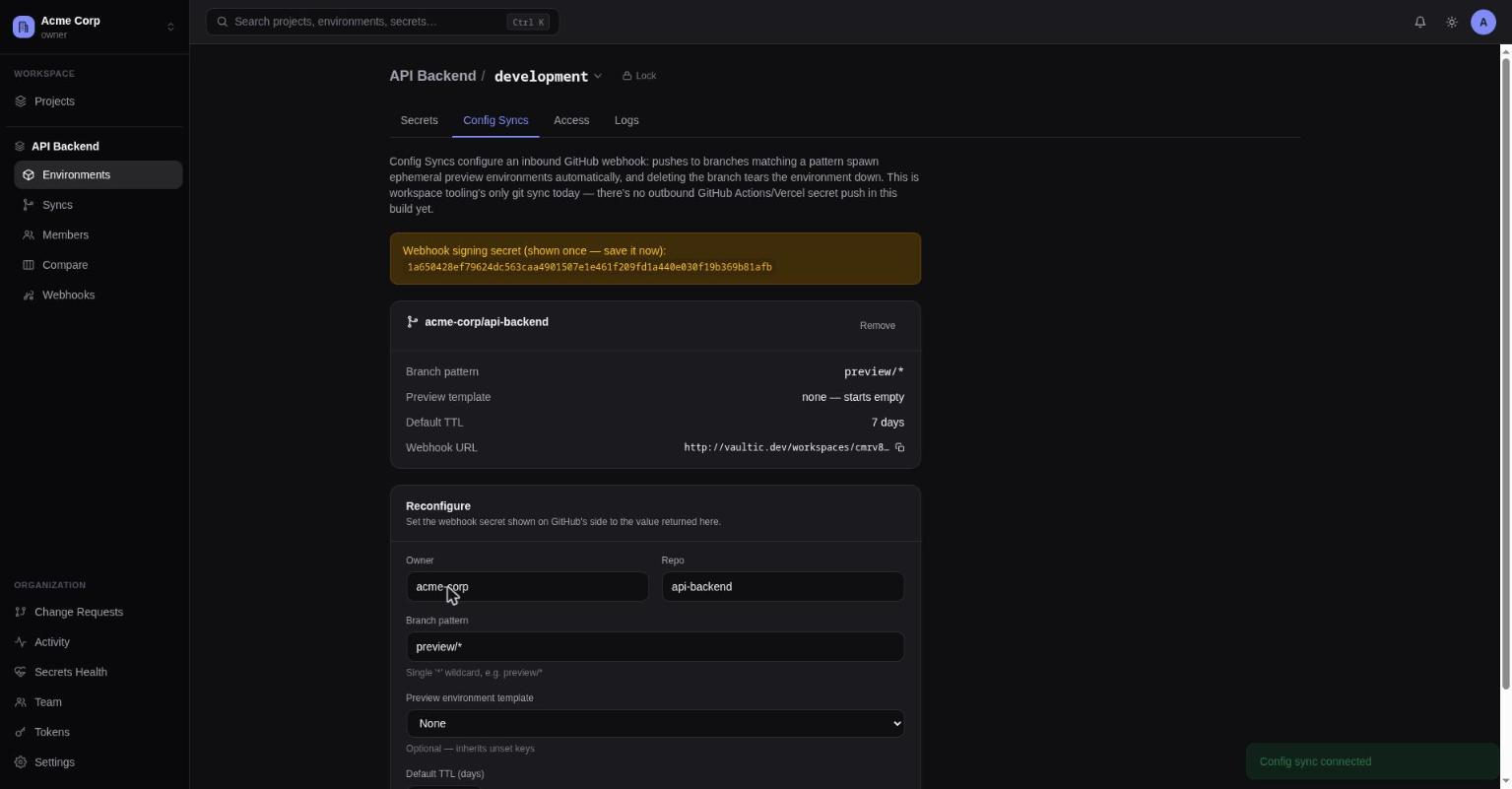
Configure:
- Owner/repo — the GitHub repository to watch
- Branch pattern — a single-wildcard glob, e.g.
preview/* - Preview environment template (optional) — an existing environment new preview environments inherit unset keys from
- Default TTL — days a spawned preview environment lives before auto-expiring
Saving shows the generated webhook URL and a one-time signing secret — copy it into GitHub's webhook settings immediately, it isn't shown again.
What happens automatically
A push to a branch matching the pattern spawns (or renews) a preview-<branch-suffix>
environment. Deleting the matching branch tears the environment down immediately. A background
job also expires any ephemeral environment once its TTL passes.
When you're looking at a single environment's Config Syncs tab, contextual badges call out whether this environment is the template others inherit from, and/or which branch it was spawned from.
Cloud secret store sync
Below the Git section on a single environment's Config Syncs tab, Add cloud secret store sync
connects that environment to AWS Secrets Manager, AWS SSM Parameter Store, GCP Secret Manager, or
Azure Key Vault. Once added, Vaultic pushes automatically — no CLI, no CI step — every time a
secret in this environment changes. See
Cloud secret store sync for the CLI equivalent
(vaultic push <target>) and how the two relate.
Add a sync:
- Target — one of the four cloud stores; picking one already configured reconfigures it.
- Target-specific settings — a prefix/path/project/vault, plus region for AWS.
- Credentials — an AWS access key, a GCP service-account JSON key, or an Azure service principal (tenant/client ID + secret). These are encrypted at rest and never shown again after saving — the form only ever accepts them, it can't display them back.
- Prune stale entries — off by default; when on, a sync also deletes cloud entries Vaultic previously created that no longer exist in this environment.
Each configured sync shows as its own card: target, settings summary, prune status, and last-sync status (a timestamp, or the error message if the last run failed). Sync now triggers an immediate push instead of waiting for the next automatic run; show history expands recent runs (reusing the same run-history list the workspace's Scheduled page uses for every other background job).
This is the server holding a real credential capable of writing to your cloud account — a
different trust model than the CLI's vaultic push <target>, which only ever uses ambient
credentials on the machine you run it from and never stores anything. Use whichever fits: the
CLI for CI/one-off pushes, this for a standing "always in sync" pipe.